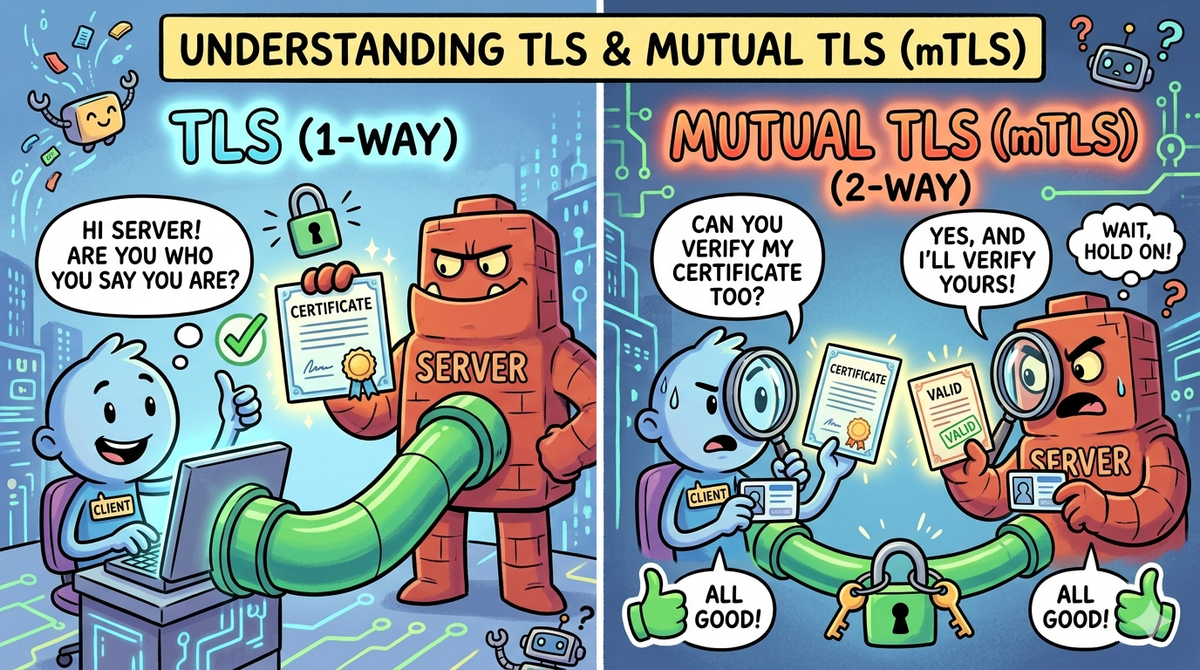
Understanding TLS & Mutual TLS (mTLS)
Let’s Explore Secure Communication! 🤓
You’ve probably heard about HTTPS and SSL/TLS while browsing the web. These protocols keep our data secure and encrypted when sending messages, logging into websites, or making online payments. But did you know there’s an even stronger version of TLS called Mutual TLS (mTLS)? It’s like two-way authentication, ensuring both the client and server are legitimate before exchanging data.
In this guide, we’ll break down TLS and mTLS in detail, covering:
- Authentication basics and why it matters
- TLS and how it secures communication
- The role of public and private keys
- Session key generation and encrypted communication
- How mTLS differs from TLS and its use cases
1. Why Does Authentication Matter?
Before diving into TLS, let’s first understand authentication — proving who you are before gaining access.
Imagine entering a VIP party 🎉. The bouncer at the door asks for your ID (authentication), checks if you’re on the list (authorization), and then lets you in. That’s how authentication works!
🔹 Why is Authentication Important?
- Security — Prevents unauthorized access to sensitive data.
- Data Protection — Ensures only legitimate users interact with services.
- Trust & Compliance — Many industries require secure authentication methods.
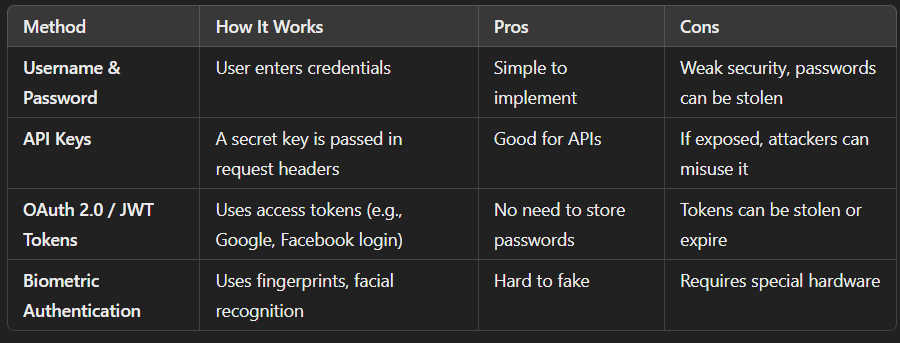
🔹 Common Authentication Methods
2. What is TLS (Transport Layer Security)?
TLS (formerly SSL) is a cryptographic protocol that secures data communication over the internet.
🔹 How Regular TLS Works (One-Way Authentication)
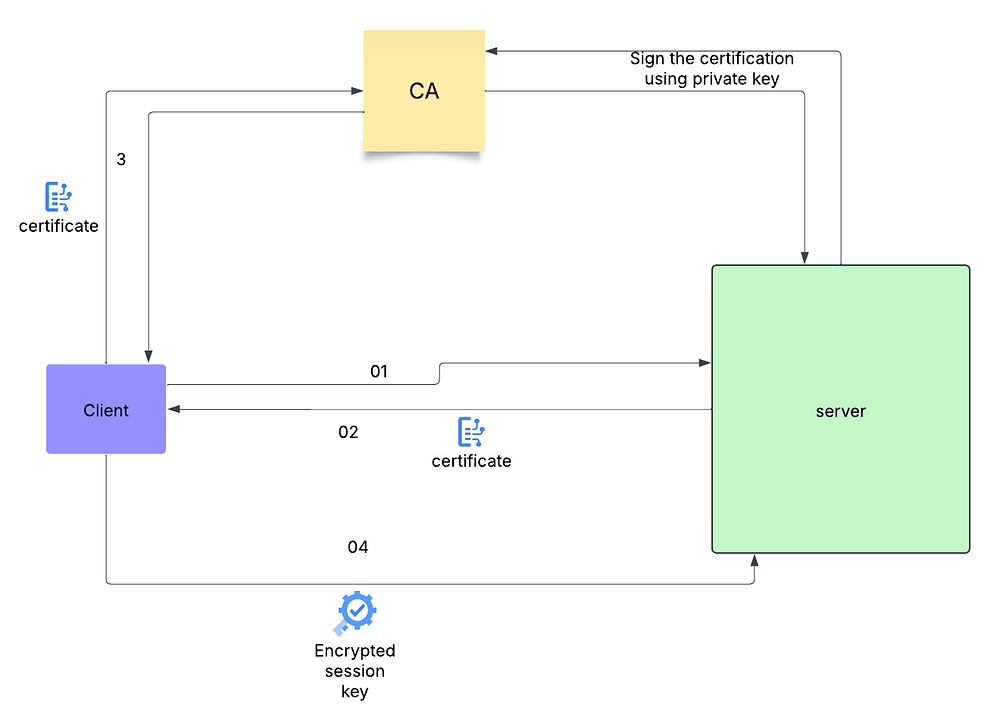
- The client requests a connection to the server.
- The server sends its TLS certificate (
server.crt) containing its public key(certified by CA). - The client verifies that the certificate is signed by a trusted Certificate Authority (CA).
- The client generates a session key and encrypts it using the server’s public key and send it to server.
- The server decrypts the session key using its private key (
server.key). - Encrypted communication starts using symmetric encryption (AES, ChaCha20).
🔹 Issue with TLS
- The client is not authenticated — any client with the correct URL can attempt to connect to the server.
3. Key Terms in TLS Flow
🔹 What is a Certificate Authority (CA)?
A Certificate Authority (CA) is a trusted entity that issues digital certificates to verify the identity of a server or client.
Think of it like a passport office, but for online authentication.
🔹 Why is a CA Needed?
- If a client gets a certificate signed by a CA, it trusts the server.
- If a server gets a certificate signed by a CA, it trusts the client.
- This prevents fake or self-signed certificates from being accepted.
🔹 The Role of Public & Private Keys
TLS (and mTLS) is built on Public Key Cryptography (Asymmetric Cryptography).
It uses two keys:
- 🔑 Private Key — Secret, known only to the owner.
- 🔓 Public Key — Shared openly, used to verify authenticity.
These keys are mathematically linked:
- Data encrypted with one key can only be decrypted with the other.
- The private key stays secret, while the public key is shared openly.
🔹 How They Work Together:
- If someone encrypts data using your public key, only you (with the private key) can decrypt it.
- If you digitally sign data with your private key, others can verify it using your public key.
🔹 What is a Certificate?
A certificate (e.g., server.crt or client.crt) is a public key wrapped with identity information, signed by a trusted Certificate Authority (CA).
🔥 What’s Inside a Certificate?
- The Public Key of the server or client 🔓
- Owner Information (e.g., domain name, company name)
- Expiration Date & Cryptographic Signature
- Issued by a Trusted CA
A certificate proves “This public key belongs to this entity.” It helps clients and servers trust each other.
4. Session Keys & Encrypted Communication
🔹 Why Do We Need a Session Key?
Public Key Cryptography (asymmetric encryption) is secure but slow. Encrypting every single message using public/private keys is computationally expensive.
✅ Solution: Hybrid Encryption
- Asymmetric Encryption (🔑 Public/Private Keys) → Used only at the beginning to securely exchange a session key.
- Symmetric Encryption (🗝 Same Key for Both) → Used afterward for fast encrypted communication.
Both the client & server use the same session key for symmetric encryption (AES, ChaCha20).
5. What is Mutual TLS (mTLS)?
mTLS enhances TLS by requiring both the client and server to authenticate each other using certificates.
🔹 How mTLS Works (Two-Way Authentication)
- The server presents its certificate (
server.crt wich is signed using CA). - The client verifies the server’s certificate.
- The client presents its certificate (
server.crt wich is signed using CA). - The server verifies the client’s certificate.
- Both exchange a session key for encrypted communication.
- Only verified clients can access the server.
🔹 Where is mTLS Used?
- APIs that require high security (banking, financial transactions)
- Microservices communication (Kubernetes, Docker)
- IoT devices (device-to-cloud authentication)
- VPNs & private networks (restricting access to authorized devices)
6. Conclusion
TLS provides encryption and server authentication, while mTLS strengthens security by authenticating both client and server. By leveraging public key cryptography and session keys, TLS enables secure communication with minimal performance impact.
🔹 Key Takeaways:
- TLS ensures encrypted communication but only authenticates the server.
- mTLS ensures both client and server authentication, making it ideal for high-security applications.
- If you’re securing APIs, microservices, or IoT devices, mTLS is essential.
💬 Have any questions or need a hands-on guide? Drop a comment!